EXAMPLE AT A GLANCE
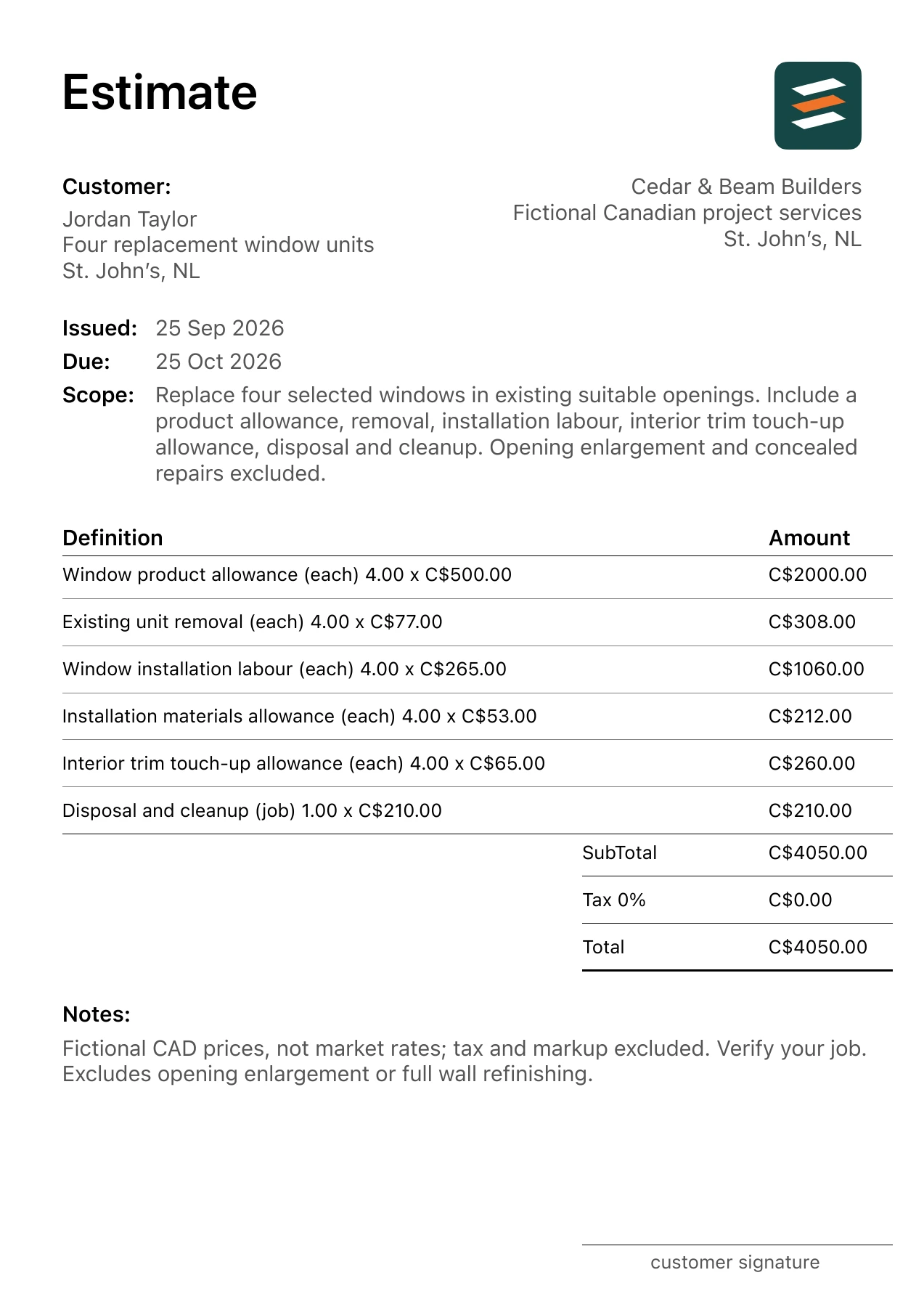
This fictional St. John’s, Newfoundland and Labrador window replacement example has 6 itemized costs and a C$4,050.00 total before tax or markup. The PDF, quantities, unit rates and scope assumptions match the table below.
Use this completed window replacement document to see how a specific job becomes a client-facing estimate. The project, business, customer and amounts are fictional. For the four replacement window units in St. John’s, Newfoundland and Labrador, the example uses the measured trade units shown in its PDF. Residential jobs may mix square feet, linear feet, counts and supplier units; keep each line’s measurement basis visible. Check exposure, access, drainage and any concealed water damage at the property. Confirm the selected product and local approval requirements before setting the final scope. The figures are fictional CAD inputs, not a local price survey.
Project scope: Four replacement window units
Replace four selected windows in existing suitable openings. Include a product allowance, removal, installation labour, interior trim touch-up allowance, disposal and cleanup. Opening enlargement and concealed repairs excluded.
- Example location
- St. John’s, Newfoundland and Labrador
- Prepared by
- Cedar & Beam Builders · fictional business
- Prepared for
- Jordan Taylor · fictional client
- Issued / valid through
- September 25 / October 25, 2026
Measure this work on the actual property before using any quantity. The illustration separates supplied products or materials from installation where the selection could change. A client should be able to compare each line with the agreed work, the selected products and the limits recorded in the notes.
The 6 itemized costs in Canadian dollars
Every row below is taken from the corresponding app-exported PDF fixture. Multiply the quantity by the unit rate to check the amount. These rates were chosen for this fictional example; they are not advertised prices or current averages for St. John’s, Newfoundland and Labrador.
| Work item | Quantity | Unit rate | Amount |
|---|---|---|---|
| Window product allowance | 4 each | C$500.00 | C$2,000.00 |
| Existing unit removal | 4 each | C$77.00 | C$308.00 |
| Window installation labour | 4 each | C$265.00 | C$1,060.00 |
| Installation materials allowance | 4 each | C$53.00 | C$212.00 |
| Interior trim touch-up allowance | 4 each | C$65.00 | C$260.00 |
| Disposal and cleanup | 1 job | C$210.00 | C$210.00 |
| Subtotal / example total | C$4,050.00 | ||
Two calculation checks:
- Window product allowance: 4 each × C$500.00 = C$2,000.00.
- Existing unit removal: 4 each × C$77.00 = C$308.00.
The PDF shows a 0% tax entry, so the illustrated tax is C$0.00 and the total remains C$4,050.00. This only describes the example. Confirm the applicable tax treatment and any markup for the real job before issuing your estimate.
Assumptions that change the price
Identify each window by room or location, dimensions and selected product. Quantity alone does not establish comparability. A customer can evaluate a quote more easily when four units refer to four specific openings.
State the installation approach and starting condition determined for the actual property. The sample assumes suitable existing openings. It does not price enlargement, reframing or a redesign of the opening.
Interior casing, exterior details and paint touch-up can differ from opening to opening. Describe the included finish work and who completes excluded tasks. A new window unit does not automatically mean every adjoining surface is refinished.
Outside this example: No opening enlargement, structural repair, full wall refinishing, specialty glazing or performance guarantees beyond the selected product terms.
Check exposure, access, drainage and any concealed water damage at the property. Confirm the selected product and local approval requirements before setting the final scope. An allowance is a stated placeholder, not a promise to cover all work discovered later. If a selected product, quantity or hidden condition changes, update the affected line and explain the revision before proceeding.
Download the actual app PDF
The linked PDF was exported from Estimates for this fictional Canadian project. It carries the project scope, customer, work items, quantities, CAD rates and subtotal used in this table, plus a short note on tax, markup and one key exclusion. The detailed exclusions above remain important when adapting the example. Preview every PDF page, including the final totals and note.
Use the structure for a real job
- Replace St. John’s, Newfoundland and Labrador and the example scope with the actual site and customer details.
- Measure the work and confirm the product schedule with the client.
- Replace every fictional CAD rate with your own labour, supplier and subcontractor inputs.
- Check exclusions, approvals, tax, markup and the document’s validity period for the real project.
- Preview the final PDF and recheck the total before sharing.
- List each opening and selected unit.
- Confirm dimensions before ordering.
- Define interior and exterior finish scope.
- Document concealed-condition and product-change handling.
Common questions
Why separate window products from installation labour?
It shows how a different selected unit changes the material amount and keeps installation assumptions visible during comparisons.
Should trim be part of a window estimate?
State the agreed trim work explicitly. Include its quantity or allowance and distinguish touch-up from complete replacement or repainting.
For the planning steps behind this document, read the window replacement estimating guide.