THE SHORT ANSWER
Estimate a kitchen renovation by defining the layout first, then separating cabinets, counters, appliances, utility work and finishes. Identify selections that remain allowances and the measurements or supplier quotes needed before the final price.
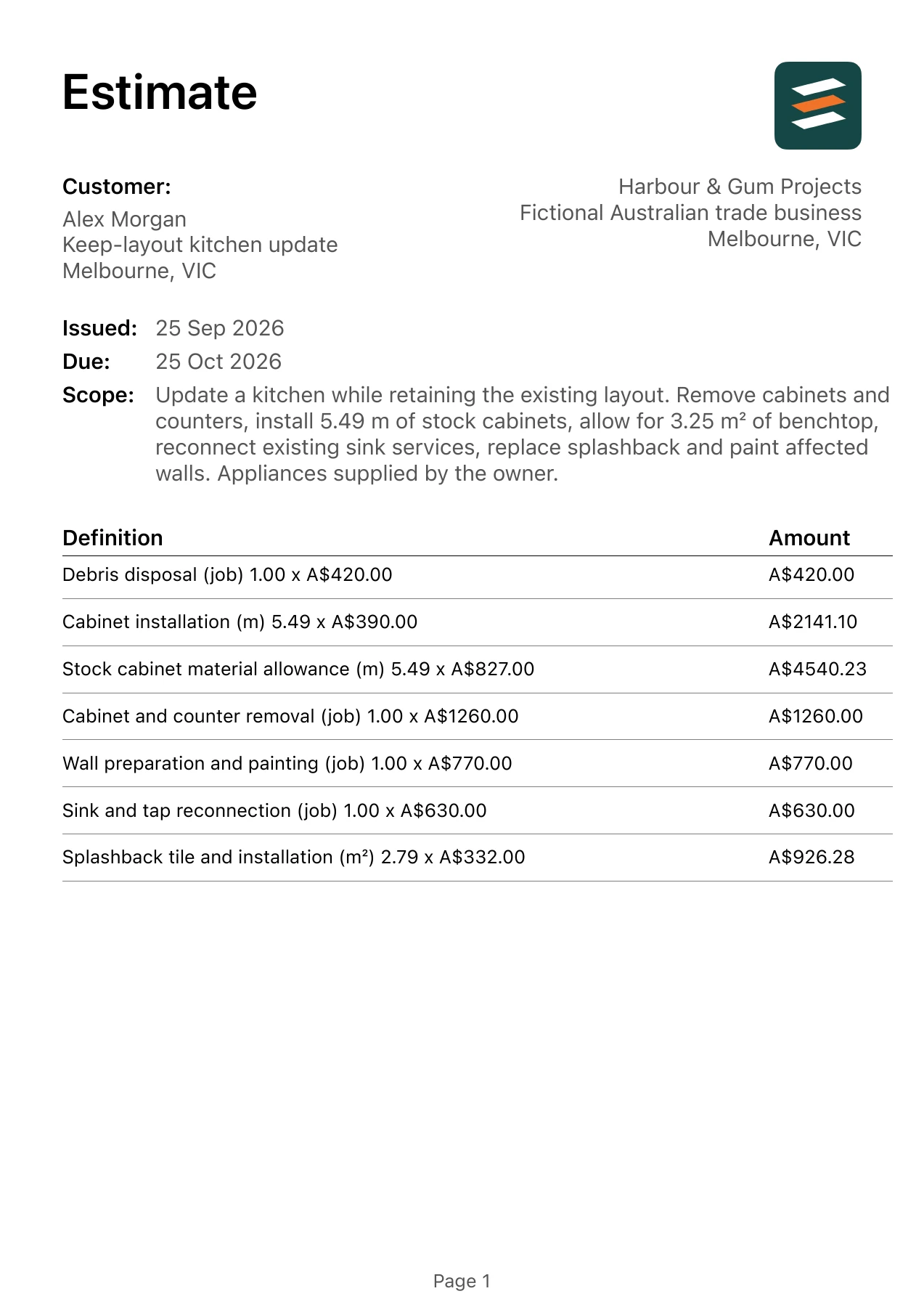
This Australian walkthrough uses a fictional keep-layout kitchen update in Melbourne, Victoria. The matching kitchen renovation estimate example shows the same item quantities and amounts in an app-exported PDF. Measure your own site and replace the example rates before issuing a client quote.
1. Use a selection schedule
List cabinet style, benchtop type, sink, tap and appliances with a selection status beside each. Mark an item as selected, owner-supplied or allowance. The estimate should make unfinished decisions visible rather than treating every choice as settled.
For this example, the agreed starting scope is: Update a kitchen while retaining the existing layout. Remove cabinets and counters, install 5.49 m of stock cabinets, allow for 3.25 m² of benchtop, reconnect existing sink services, replace splashback and paint affected walls. Appliances supplied by the owner. A change to a listed surface, product or access assumption should trigger a revised line or allowance.
2. Give cabinets a measurable basis
A metre-based cabinet allowance can help explain an early example, but real cabinet pricing also depends on the unit schedule, drawers, end panels and accessories. Reconcile the allowance against the supplier’s actual list before presenting it as a final product price.
3. Keep appliance responsibilities explicit
Owner-supplied does not automatically include unloading, moving, installation or disposal of old appliances. State which of those tasks is included. Confirm that dimensions and connection requirements are available before committing to the installation scope.
4. Identify dependencies before scheduling
Benchtop measurements, cabinet delivery and splashback completion depend on earlier steps. Include a plain-language assumption about product availability and access. Do not use the estimate to promise a completion date that has not been checked against those dependencies.
Worked kitchen renovation calculation
Two checkable lines from the example are 5.49 m × A$827.00 = A$4,540.23; 5.49 m × A$390.00 = A$2,141.10. The full 8-line estimate totals A$13,871.05 with the demonstration tax input at 0%. The amount is a fictional scenario, not an Australian market rate or a recommended selling price.
Material purchasing and installed quantities may differ. For your own estimate, use the actual takeoff, supplier prices, labour plan, access and disposal requirements. Decide how overhead, profit and the applicable tax treatment affect your final quote; do not copy the example's zero tax setting.
Before you share the estimate
- Reconcile cabinet quantities with a supplier list.
- Identify sink cutouts, end panels and hardware.
- Assign appliance delivery and installation responsibilities.
- Separate layout changes from the keep-layout base scope.
Scope boundary in this example: No wall removal, structural alterations, utility relocation or appliance purchase. Benchtop and cabinet selections remain example allowances.
Confirm the client details and location, item descriptions, measured units, total and validity date. If opening up the work reveals a different condition, document the changed scope and price before proceeding.
Common questions about kitchen renovation
Can I quote a kitchen before all selections are final?
You can prepare an estimate with clearly labelled allowances. Explain which selections may change the total and replace the allowances with confirmed supplier quotes before treating them as fixed prices.
Should cabinets and benchtops be one line?
Separate them when they have different suppliers, quantities or selection assumptions. It makes scope changes and customer comparisons easier to understand.
FROM SCOPE TO PDF
Make your own kitchen renovation estimate.
Describe the actual job in Estimates on iPhone or Android, then review every quantity, rate and scope note. Add your business and client details, check the document and share an itemised PDF. Example amounts are fictional, and some app features may require an in-app purchase.